A student in r/CollegeRant said, “ALEKS is possibly one of the most atrociously designed math programs I have ever seen…”
While that student might be saying it out loud, students across the US using ALEKS have a similar opinion. The reason is probably the adaptive algorithm. Assessment and Learning in Knowledge Spaces (ALEKS) is an adaptive learning and assessment platform that is widely used by institutions to streamline the process of teaching and learning. ALEKS PPL (Placement, Preparation, and Learning) is supposed to help students learn better and independently.
However, the algorithm is designed in a way that if you make a mistake near the end of a topic, ALEKS adds extra practice problems to re-evaluate your mastery, extending the time needed to finish. Meaning you need to invest a lot of your valuable time and also need to be very cautious when entering answers.
If you too are equally frustrated with the platform, then this blog is for you. We have shared tips to help you navigate ALEKS assignments and deadlines without stress.
Key Takeaways: Navigate ALEKS Assignments and Deadlines without Stress
- To finish the ALEKS Knowledge Check Pie within the deadline, you need to practice problems before starting with the topic.
- Work carefully through each topic rather than guessing. ALEKS uses a point-based system to track progress within a topic, and consecutive correct answers can help you progress more efficiently.
- Use the “Explain” feature to your benefit to understand the explanation and step-by-step breakdown of complex problems.
- Use external sites like YouTube to watch tutorials and learn to solve complex problems.
- Hire an expert to get accurate answers when the deadline is approaching and you have a time crunch.
How Does ALEKS Pie Work?

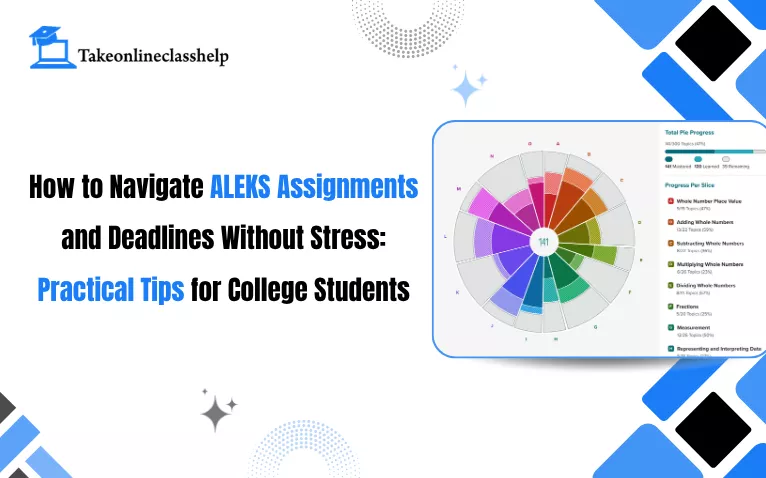
The ALEKS Knowledge Check pie chart tracks your progress and mastery on a particular concept or chapter. The entire course is designed based on an artificial intelligence algorithm that guides the platform.
- ALEKS first takes a test to measure your knowledge.
- The test result helps ALEKS understand what you already know and, based on that, what you need to learn next.
- Then comes the colorful ALEKS Pie Chart, which fills the colors in the chart based on your mastery throughout the coursework.
- Within each pie slice, darker shading represents mastered topics, lighter shading represents learned (but not yet mastered) topics, and unshaded space represents remaining topics to be learned and mastered.
From practice problems to immediate response and explanations, ALEKS believes in authentic problem-solving rather than guessing. And this is exactly what frustrates most students.
To finish ALEKS topics fast, students usually solve two to three or sometimes five practice problems and jump to homework sets. However, the lack of practice basically leads to mistakes, which consume more time.
Sometimes, students actually understand the concept after practicing 5 questions, but oncorrect answers can reduce your progress within a topic, which may mean additional practice is needed before the topic is marked as Learned.
How to Catch Up on ALEKS Topics?
To catch up on missed or past-due ALEKS topics, use the filter and carousel menu in your learning path to select specific objectives or search for unmastered concepts in your ALEKS timeline view study guide.
- Click on the hamburger menu, which is the three horizontal lines, and select Learn.
- In the Learn section, you will need to open the topic carousel dropdown.
- Then, you need to use the Filters option to view objectives or scroll to your past-due/future-due objectives.
- If you want to match your instructor’s specific schedule or office hours, you can search a specific topic in the search bar.
- Lastly, you need to select the desired topic and start working through the practice problems.
4 Strategies to Catch Up with ALEKS Topics Fast
Answer Correctly in a Row
ALEKS tracks topic progress using a point system: students earn points for correct answers, with extra points for consecutive correct ALEKS answers completed without viewing the Explanation page. Once enough points are earned, the topic is marked as learned; mastery is confirmed through Knowledge Checks and continued performance.
Read the “Explain” Feature
When you click on the “Explain” button, you must not skip the tutorial. This is one of the best features in ALEKS, which helps break down problems and definitions immediately if you get stuck.
Use External Guides
Many students also use Quora, Reddit, Quizlet, and YouTube to learn concepts. You will find multiple walkthroughs and explanations of math problems to speed up the learning process.
Avoid Guessing
You might think that guessing will ultimately get you the correct ALEKS answer key, but it instead signals the algorithm that you are not prepared. Also, do not click on the “I don’t know” button unless you are actually clueless about the topic.
How to Finish ALEKS Pie Fast without Burnout?
The easiest way to finish ALEKS Pie Chart fast without burnout is to reach out to an online class help service. Hiring subject experts with hands-on experience with ALEKS makes it much easier to get accurate answers and complete your required modules. Since the experts take all the heat, you can actually focus on learning rather than finishing off the coursework.
Overwhelmed by your ALEKS Knowledge Check? Get 1-on-1 expert math tutoring to master tough topics before your next deadline.
5 ALEKS Knowledge Check Tips for Better Time Management

Tip 1# Plan Your Week around the “~30 Topics = 1 KC” Rhythm
Progress Knowledge Checks typically occur after students have learned about 20 topics and spent around 5 hours in Learning Mode, after about 10 hours in Learning Mode, or after certain periods without a Knowledge Check (e.g., 30–60 days, depending on the course).
The game is that ALEKS Knowledge Checks tend to trigger after roughly every 30 new topics mastered unless your instructor changes it. So, use it to your benefit.
Tip 2# Use the 24‑hour Delay Strategically (Don’t Start KCs Tired or Rushed)
ALEKS sends you a notification when a KC is due. So, you typically get a 24‑hour window to begin ALEKS Knowledge Check, and you can also delay it up to 24 hours if you need more review time. The idea is not to start ALEKS topics when you are mentally exhausted or when your brain is not braining; this delays your chances to get correct ALEKS solutions.
Before you start a KC, click on ‘Review for Knowledge Check’ to brush up on your knowledge.
Tip 3# Stick to One Topic Branch and Finish “Gateway” Topics First
To date, most academic experts and now even your fellow ALEKS users say that jumping from one topic to another never really reduces the burden. Students have said that tackling ALEKS topics in a logical sequence, staying on a single branch of the pie, and completing gateway topics that unlock whole sections saves time.
Basically, time‑management for college students wins. Fewer context switches and fewer “I have to relearn this entire topic” loops after a KC miss.
Tip 4# Treat KCs Like Mini‑Exams: Budget Time Per Question and Monitor Pace
Most students make the mistake of treating ALEKS Knowledge Checks as a random learning platform. Instead, you can utilize it to improve your exam time management. When working on ALEKS KCs, calculate your time to solve questions and check progress at 25/50/75% of the time.
Students should treat Knowledge Checks like focused assessments: work steadily, read each question carefully, and give their best answer on every item.
Tip 5# Build a Lightweight “KC Notebook” and Mistake Log
Not many will tell you this, but always keep a notebook handy. We understand that in the digital era, noting down points or solving questions in a notebook seems like a waste of time, but it actually helps you in times of need.
For each topic, jot down the equations, formulas, and your common errors (e.g., sign errors, misreading “at least” vs “at most”). Now, before you sit for exams or a new topic in the Knowledge Check, skim through your workbook and get things done quicker.
Stuck on a tricky ALEKS topic? Connect with a qualified tutor today.
What Happens If You Miss an ALEKS Assignment Deadline?

Step 1: Confirm Exactly What’s Late and by How Much
First of all, go to ALEKS, check the assignment tab, and check for the original due date/time, any “late until” date shown, and how many topics/questions are still incomplete.
This will help you determine whether the ALEKS assignment is still open for late work or has fully closed.
Step 2: Check Whether Late Submission Is Enabled
Next, you need to look for notifications such as:
- A message like “Late submission allowed until [date/time].”
- A visible penalty note (e.g., “10% late penalty applies after due date”)
- The ability to still start/continue the assignment after the due date
If the assignment shows closed or unavailable, then late submission is probably disabled.
Step 3: Read Your Course Syllabus and LMS Announcements
Open your course syllabus (PDF or LMS page) and search for “ALEKS”, “Late”, “Homework”, “Objective”, or “Penalty”.
Look specifically for lines like:
- “Late ALEKS homework accepted until [date] with X% penalty”
- “No late ALEKS assignments accepted”
- “24‑hour grace period after due date with no penalty”
- “Lowest ALEKS objective dropped” or “X late passes allowed”
Also check recent announcements on Canvas, Blackboard, or Moodle for late-submission rules or extensions.
Step 4: Decide Your Next Move Based on What You Find
|
Case A: Late submission IS allowed |
Case B: Late submission is NOT allowed (assignment is closed) |
Result: You’ll get credit minus whatever penalty your instructor set. |
Result: You may or may not recover points for this assignment, but you protect your grade going forward. |
Step 5: Email Your Instructor (If Needed)
Use this simple template and customize the bracketed parts when sending an extension request to your instructor:

Conclusion
ALEKS Knowledge Check is not as challenging as you think. If you learn the platform a bit better, you will be able to navigate ALEKS assignments and deadlines without stress. Now, to know the platform better, you need to log in every day, spend at least an hour, and solve practice problems. Shortcuts cannot actually lead you to success with ALEKS. However, if you ever get stuck with ALEKS, feel free to reach out to us.
Don’t let tight deadlines pull down your GPA. Whether you need step-by-step guidance on complex formulas or personalized practice strategies, our academic tutors are here to help you succeed.
Frequently Asked Questions about ALEKS Assignments and Deadlines
How to prioritize ALEKS when you’re already behind?
Start by listing every unfinished ALEKS assignment with its due date, remaining topics, and grade weight. Next, you need to prioritize work that is due soonest or has the greatest impact on your grade.
Check whether any assignments have a late-work cutoff, then estimate how much work remains and divide it into manageable study blocks. If you cannot realistically finish everything before the deadline, review your syllabus and contact your instructor early about available options
How much time should you budget for ALEKS assignments?
There is no single amount of time that works for every ALEKS assignment. The time needed depends on the number and difficulty of topics, your existing knowledge, the type of assignment, and your instructor’s course settings.
At the beginning of each week, review your upcoming ALEKS workload and estimate the time required based on your recent pace. Break larger assignments into shorter sessions and leave extra time before the official deadline in case you need additional practice or review.
What to do if ALEKS progress drops after a Knowledge Check?
It might happen when ALEKS reassesses your topic knowledge. In case this happens, you need to review the changed topics, walk through the recommend matrials, and continuously practice to improve your knowledge.
ALEKS assignment not showing or not loading: What should you do?
First of all, you need to refresh the page. If the problem persists, you need to verify the course details and due date. If the problem is still not resolved, you will have to connect with the instructor.
What to do when multiple ALEKS assignments are due the same week?
You need to list all ALEKS assignment deadlines and estimate the time you will need for each assignment. Start with the earliest or most time-consuming tasks, then divide the remaining work across the week.

Want To See My Profile — Check Now
- How to Navigate ALEKS Assignments and Deadlines Without Stress: Practical Tips for College Students - September 11, 2026
- How to Cheat on ALEKS Test in 2026 – Tried and Tested! - April 25, 2026
- How to Get Cengage MindTap Answers without Cheating? - April 16, 2026