
A WeBWorK syntax error happens when the system fails to interpret what you have entered in the answer box. However, this happens before your math is graded. This issue is quite common in Calculus I, II, or III assignments.
The main reasons why this happens are:
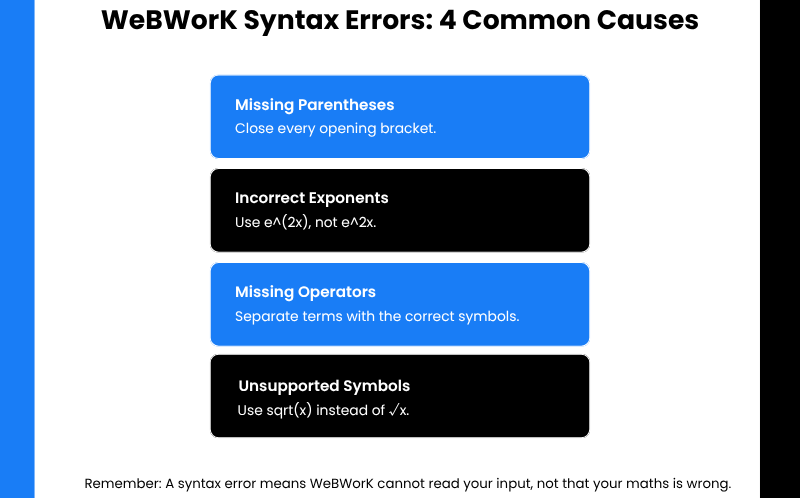
- Missing parentheses.
- Letters run together (no space in between).
- Functions typed the way they look on paper (without using the built-in palette).
The quick fix is to rewrite your entire input in the right format. To ensure you have followed the right rule, always check the answer through Preview My Answers before submission.
This guide is exclusively focused on how to understand WeBWorK syntax errors. We have explained each error message. Keep reading to learn how to enter derivatives, trig, exponential, log, and integral answers.
Finally, we have shared some useful tips to stop errors early, along with topic-by-topic examples you can use in your next problem set.
Key Takeaways on How to Understand WeBWorK Syntax Errors
- A syntax error message doesn’t equal an incorrect answer. It is a reading failure of the system.
- WeBWorK’s order of operations interprets your entry. The meaning of your answer depends on parentheses usage.
- All multi-term exponents and functions must use their own parentheses.
- To check whether the system read your entry as correct, use the Preview My Answer feature.
- The format of the antiderivative problem determines whether you need + C.
What Does Syntax Error Mean in WeBWorK?
University of Rochester, backed by the Mathematical Association of America (MAA), designed the WeBWorK platform. When checking student answers, this platform uses MathObjects. It generally turns your typed input into math. The operation takes place in two stages:
- Parsing: MathObjects first reads your input text and then builds an expression.